Prop firm journal · iPhone
Know your buffer before you click.
Import the CSV export from your futures platform. Calmfill checks it against your prop-firm rules and shows how much room is left — and what broke the last session.
Coming to the App Store · 7-day free trial · $79.99/year · No trade signals, no advice.
01 / How it works
From export to next session in four steps.
 F.01
Futures CSV import
Import the export
Share the CSV from your platform to Calmfill or pick the file. Orders, fills and statement reports are reconciled, and every figure links back to the row it came from. Nothing is saved until you confirm.
 F.02
Drawdown tracker
Set your prop rules
Pick your account type — daily loss limit, trailing or end-of-day drawdown, consistency, trading days, contract limits — or type in your own plan.
 F.03
Prop firm tracker
See your buffer
One number first: how much room is left before the next rule breaks. Each figure is marked observed, estimated or unknown.
 F.04
Trading journal
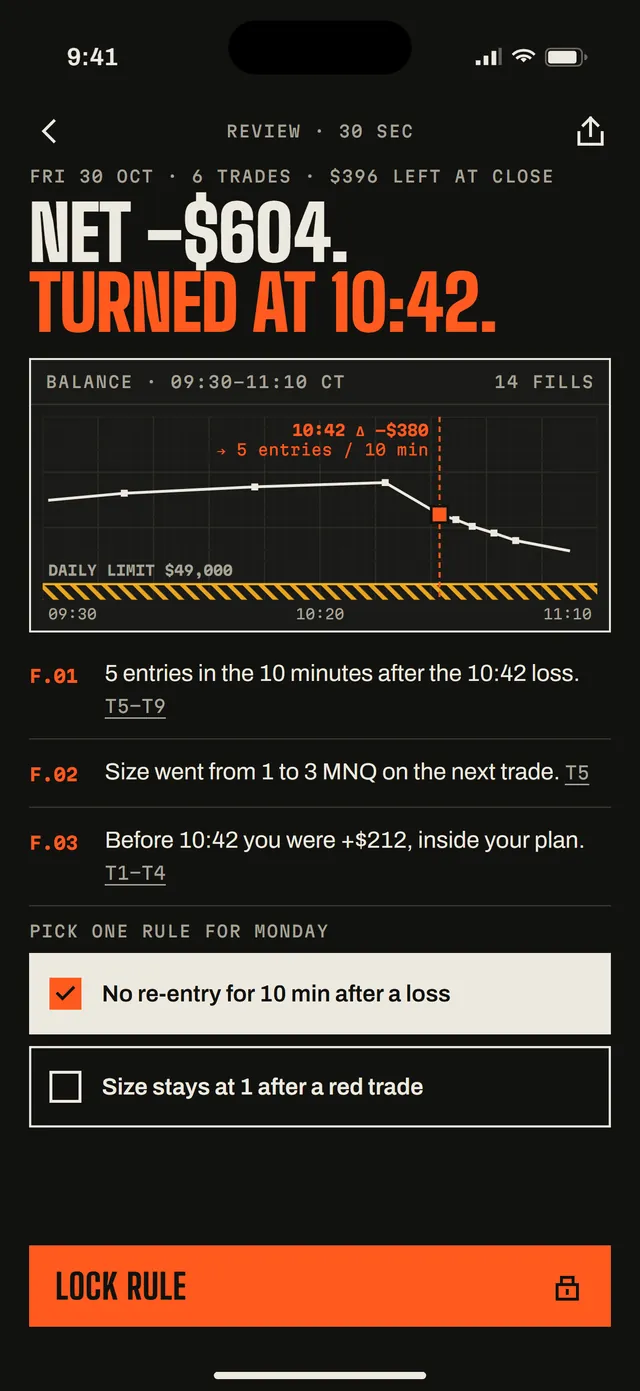
Review in 30 seconds
Where the session turned and what happened after, linked to the trades. Then pick one rule for the next session.
02 / Prop rules
Every number says how sure it is.
Exports carry realized results at fill times, not the open-trade path between them. So Calmfill labels each figure instead of pretending.
- Observed
- Read straight from your export, or exact arithmetic on it.
- Estimated
- Depends on a stated assumption — a fee rate you entered, or open-trade equity the export does not contain.
- Unknown
- Not in this export. Shown as “—”, never guessed.
- Breach
- The imported data shows the limit was crossed, with the time and the trades.
For rules a firm enforces on intraday equity, “no violation” is never shown as observed. At best it is estimated.
What it checks
- R.01Daily loss limit
- R.02Max drawdown — trailing (intraday or end-of-day) or static
- R.03Profit target
- R.04Consistency rule
- R.05Minimum trading days
- R.06Contract limits
Presets follow the firms’ published rules as of a stated date, or enter your own numbers. Not checked: news windows, scaling plans, payout caps.
03 / What we don’t do
No signals. No predictions. No cloud.
No trade advice
Calmfill never tells you what to buy, sell, or when. It describes what already happened in your file.
No predictions
No pass-probability scores, no “AI predicts”, no promise you’ll pass an evaluation.
No broker connection
It reads files you export. It can’t place orders and never asks for your platform login.
No account, no cloud
Your trades stay on your iPhone. We can’t see them, so we can’t lose, sell or leak them.
Not a prop firm
Calmfill isn’t affiliated with any prop firm, broker or platform. Your firm’s dashboard has the final word.
04 / Pricing
Free to start. Pro when you need the rest.
Free
$0- 1 account
- Unlimited imports with reconciliation
- Buffer to the daily loss limit and max drawdown
- Sessions with “where this number comes from”
- First 3 session reviews
Always free: Face ID lock, encrypted backup, export and delete.
Pro
- More accounts
- Every rule: profit target, consistency, trading days, contracts
- Every session review
- Voice notes
- Account economics: evaluation and reset fees vs. payouts received
- Discipline card to share — never shows P&L
$79.99 / year
Monthly
$12.99 / month
7-day free trial on both plans.
Prices in USD. Subscriptions are bought inside the iOS app through Apple; Apple shows the final price in your currency before you confirm. Renews automatically unless cancelled at least 24 hours before the period ends.
05 / FAQ
Straight answers.
Which platforms can I import from?
CSV exports from popular futures platforms: order and fill reports, statement reports (performance, positions, cash and balance history) and trade exports. The exact list of supported formats is inside the app under Settings → Supported imports.
Does Calmfill connect to my broker or prop firm account?
No. It never asks for a login and can’t place orders. You export a CSV from your platform and open it in Calmfill.
Which prop firm rules does it know?
It ships presets for several popular evaluation and funded account types, each checked against the firm’s published rules on a stated date. You can also enter your own daily loss limit, drawdown and other numbers. Firms change rules — your firm’s dashboard has the final word.
Why is a number “estimated” or “unknown”?
Exports show results at fill times, not your open-trade equity between fills, and some leave out fees. When a figure depends on an assumption it is marked estimated; when the file can’t support it, it is unknown and shown as “—”.
Is it trading advice?
No. Calmfill doesn’t give signals, recommendations or predictions. It shows what your own file says about your rules. Not financial advice.
Where is my data stored?
Only on your iPhone. There is no account and no Calmfill server for your trades. To move to a new phone, create an encrypted backup in Settings and restore it on the new device. We can’t recover a lost backup password.
How do I cancel?
Subscriptions are handled by Apple: open Settings on your iPhone → your name → Subscriptions → Calmfill → Cancel Subscription. Refunds are requested from Apple too.
06 / Get the app
Coming to the App Store.
Leave your email and we’ll write once when Calmfill is live. We’ll ask you to confirm first. No spam, unsubscribe in one click.